Agentic Hub is where we run our AI workloads. It lives on Kubernetes. Teams want a cluster to try an idea and a big one with GPU machines when it goes live. Each cluster needs a network, machines, a place in our list of clusters, a web address with a certificate, a safe for passwords, and monitoring. For a long time, all of that lived on a checklist. Someone clicked through the cloud console, ran Terraform for the infrastructure network, and did the rest with whatever commands they remembered.
A simple wish
We wanted to write down what we need in one file, hand it over, and get the cluster back, the same way every time. If we delete the file, the cluster goes away. A test cluster and the production cluster should come from the same code. And the tools every AI workload needs, like monitoring, secrets and GPU support, should already be there on day one.
Why crossplane
We picked Crossplane, and the reason is mostly one idea: it never stops looking at what it built. Three things follow from that, and they matter more for us than any feature list.
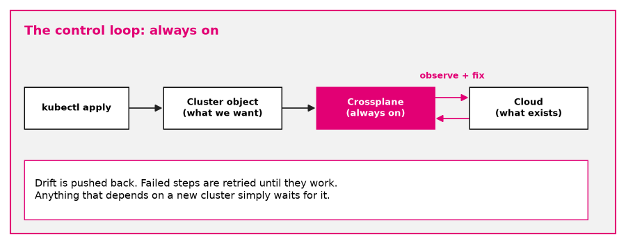
Image 1. A control loop keeps comparing what we asked for with what exists, and closes the gap.
First, drift gets fixed instead of discovered. Users change things in the console, it happens, and with a tool that only acts when somebody starts it, you find out much later, if at all. Crossplane keeps checking. If something drifts, it puts it back. If a step fails because a quota is full, it tries again later. For a platform that AI teams depend on, that quiet self-repair is worth a lot.
Second, the cluster and the things inside it come out of one flow. To install software on a new cluster, you need to log in to it, but the cluster does not exist yet when you start. Here the login simply shows up once the cluster is ready, and the installs that were failing a minute ago start working. Everything waits and retries on its own, with no pipeline stitched together to hand over from one stage to the next.
Third, teams get a real interface. A Cluster is a normal Kubernetes object. It has a schema, it checks input, it follows the same access rules as everything else, and kubectl can explain every field. Teams fill in a short file and never see network IDs unless they want to. The live state is in Kubernetes itself, so there is nothing extra to store or lock.
How it works, in plain words
Crossplane runs inside Kubernetes. We keep one cluster, the hub, that builds other clusters. On the hub, we taught Kubernetes a new word: Cluster. When someone creates a Cluster object, a recipe (Crossplane calls it a composition) turns it into everything we need: the network, the cluster and its machines, the entry in our cluster list (we use Rancher), the DNS name, and the tools on top.
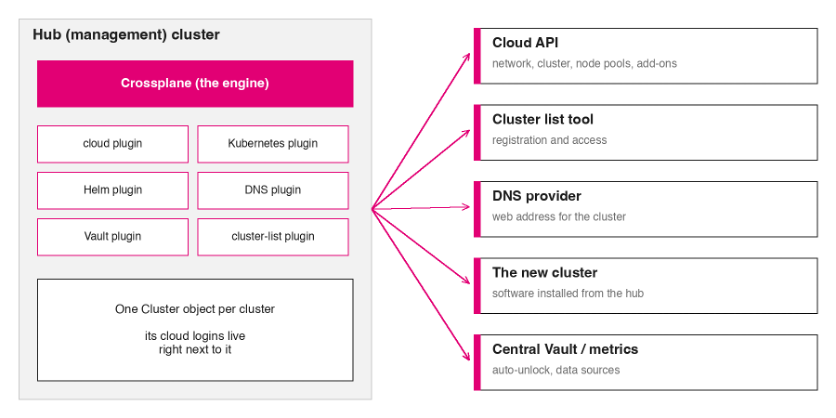
Image 2. The hub talks to the cloud, to DNS, to the cluster list and to the new cluster.
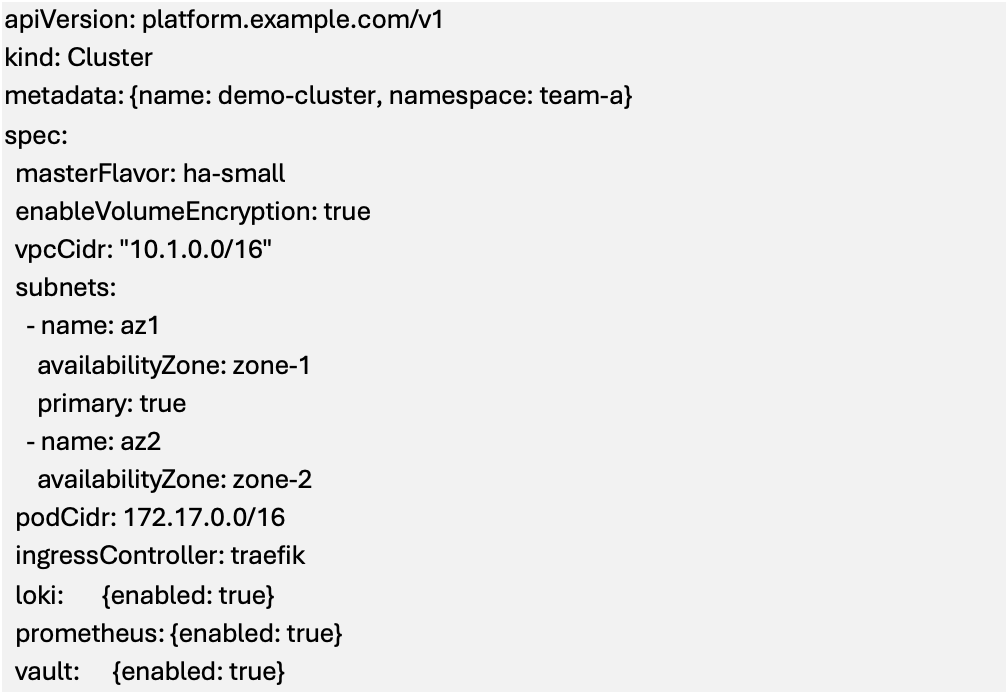
This is what a team writes.
The first cluster creation
The first time we applied a file, we watched and waited. After about 30 minutes, with nobody touching anything, there was a working cluster with the whole platform on it, ready for AI workloads.

Image 3. What happens after you apply the file.
The logs can look scary in the middle of the build, because things keep retrying until the new cluster is ready. That is normal.
Crossplane works out the right order on its own. Anything that has to wait for something else simply waits and retries.
Our clusters have no public entrance. For agents that work with internal systems and data, that is a requirement. To still manage them, each cluster is bootstrapped from a temporary, isolated environment that exists only during the build and is gone afterwards.
Then the clusters multiplied
Once the first cluster worked, more followed, and Agentic Hub kept asking for more. This is where the approach really paid off.
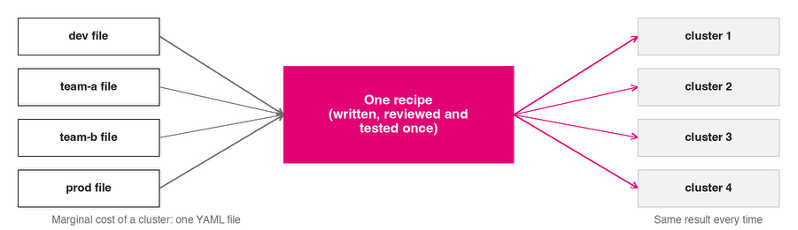
Image 4. Every cluster is a file. The logic lives in one place.
- A new cluster costs one file. We copy an existing one, change the name and a few fields, and apply it when we need it. Test and production clusters use the same recipe, so what we test is what we ship.
- Fixes happen once and every cluster picks them up. If one cluster needs to stay on an older version for a while, we can pin it.
- More teams do not mean more work for us. A Cluster is a Kubernetes object, so access works like everything else, and every cluster has its own namespace for its logins. Teams never need access to the cloud account itself.
- More machines are just data. Extra pools of machines are a list in the file, including GPU pools for model workloads. We add one pool per zone when we want the nodes spread out.
Then the apps, and then other clouds
When clusters came out the same every time, we used the same idea for our applications. A second repository holds a Helm chart with one Crossplane file that describes the whole application layer: a CI/CD tool, a login service, dashboards and a GitOps tool. Three user groups are created once, and the same groups set the rights in the dashboards and in the GitOps tool. One change in one place. Same tools, same review, same way of thinking.
Clusters are only part of the story. Our platform already creates its buckets with Crossplane, for observability and backups. The same goes for the applications on top. If an app needs a database or a bucket, it does not need a ticket or a console session. The team describes what it needs next to the app, and Crossplane creates it, keeps checking it, and hands the app its connection details. Because it comes from the same kind of file.
Our workload clusters run on T-Cloud Public. The hub and the DNS zone run on AWS, so one Crossplane already works with two clouds, each with its own plugin and its own logins. We also run Kubernetes on AWS, Google Cloud and Azure
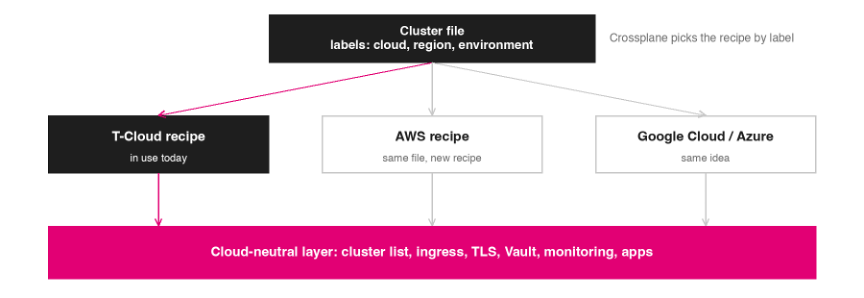
Image 5. Only the bottom of the stack depends on the cloud. T-Cloud is what we run today.
Everything above that is plain Kubernetes and does not care where the machines are. So a second cloud means a second recipe behind the same Cluster file, picked by a label. Our files already carry labels for cloud, region and environment for this reason.
Want to know more?
Contact us, or explore ai-data.telekom.com.